Electronic Signature vs Digital Signature: Key Differences
Electronic signature vs. digital signature explained. Learn how they differ in security, legal validity, and use, and which one your PDF needs.
Electronic Signature vs Digital Signature: What’s the Difference?
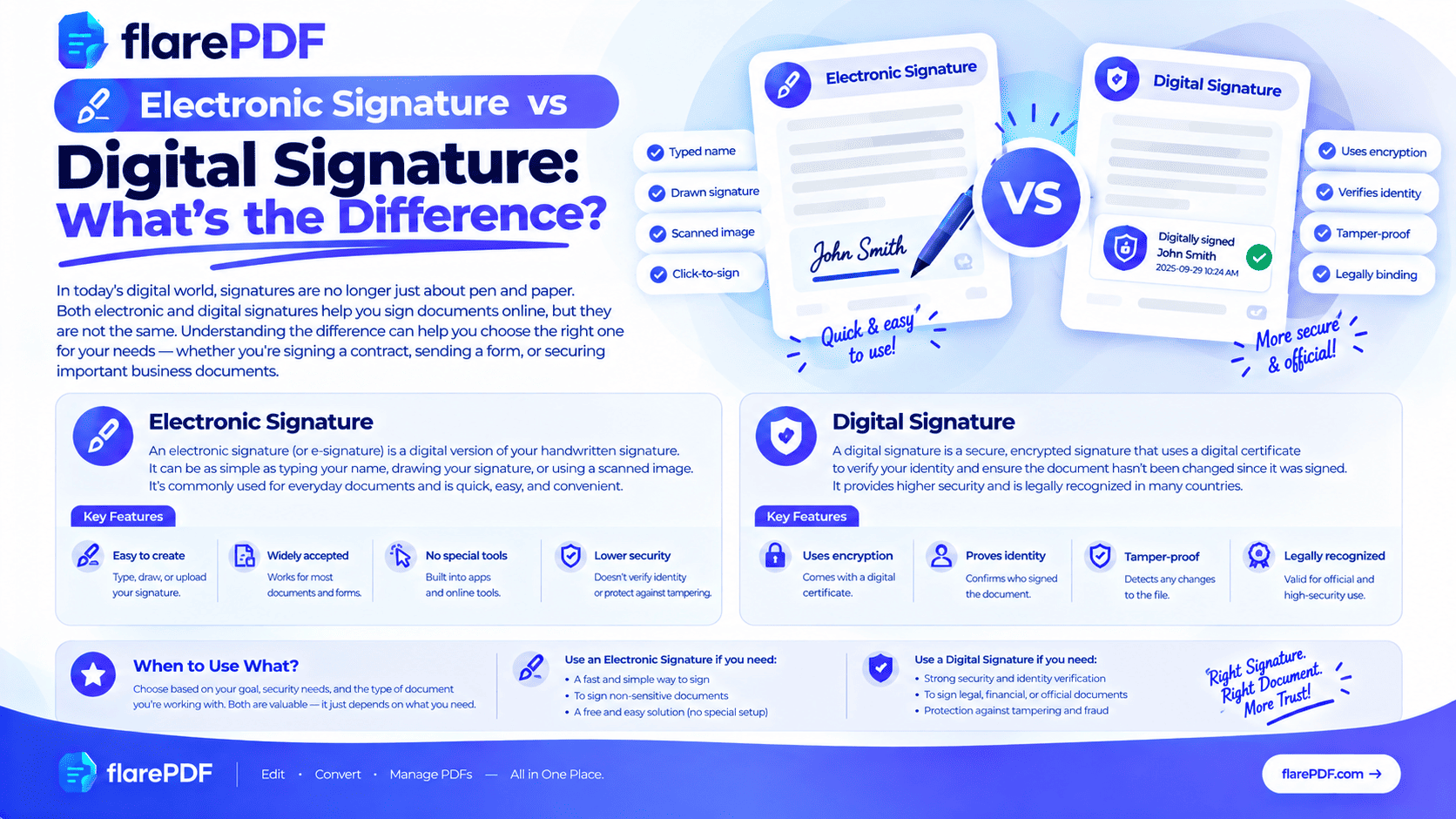
Electronic signature vs digital signature: an electronic signature is any electronic mark of agreement, like a typed name or drawn signature. A digital signature is a more secure type that uses a certificate and encryption to prove who signed.
People use the two terms as if they mean the same thing. They don’t. Mixing them up can cause real problems. You might send a simple signature where a certified one was required, or you might pay for complex tools you didn’t need.
This guide explains both in plain English. It covers how each works, how secure they are and whether they’re legally binding, plus how to decide which one your document needs. When you’re ready to sign, FlarePDF tool is free, with no sign-up.
What is the difference between an electronic signature and a digital signature?
An electronic signature is any electronic way of showing you agree to a document. A digital signature is a specific type of electronic signature that uses a certificate and encryption. The certificate proves the signer’s identity, and the encryption shows whether the document changed after signing.
Here’s the one line to remember:
Every digital signature is an electronic signature, but not every electronic signature is a digital signature.
Think of “electronic signature” as the big family. Digital signatures are one member of that family, the most secure one.
What is an electronic signature?
An electronic signature (e-signature) is any electronic sound, symbol or process that shows a person’s intent to sign a document. It can be a typed name, a drawn signature, an uploaded image of your handwriting, or a click on an “I agree” box. Its main job is to record consent.
Electronic signature examples
- Typed name: typing your full name into a signature field
- Drawn signature: signing with your mouse, trackpad or finger
- Uploaded image: adding a photo or scan of your handwritten signature
- Click-to-sign: ticking a box or clicking “I accept”
- Email sign-off: in some situations, a typed name at the end of an email
These are fast and easy. Most people sign job offers, rental agreements and delivery receipts this way.
What an e-signature does and doesn’t prove
A basic electronic signature shows intent. On its own, it doesn’t strongly prove identity, and it doesn’t stop someone from editing the document later. That’s why many signing platforms add an audit trail: a record of emails, IP addresses and timestamps showing who signed and when.
What is a digital signature?
A digital signature is a certificate-based electronic signature that uses cryptography to verify the signer’s identity and protect the document from changes. It’s linked to a digital certificate issued after identity checks. If anyone edits the document after signing, the signature shows as invalid.
Digital signature examples
- A certificate-based signature in Adobe Acrobat, created with a digital ID
- A Digital Signature Certificate (DSC) used for company and tax filings in India
- A qualified electronic signature (QES) in the European Union
- A government-backed digital identity, such as UAE Pass in the UAE, used to sign official documents
What a digital signature proves
A digital signature proves three things:
- Authenticity: who signed, backed by a certificate
- Integrity: the document hasn’t changed since signing
- Non-repudiation: the signer can’t easily deny signing it
That’s why digital signatures are preferred for government filings, tenders and high-value or regulated documents.
Why does the difference matter?
Choosing the wrong signature type can delay a deal or get a document rejected.
Here’s where the difference shows up in real life:
- Work: most contracts accept a simple e-signature, but some clients or regulators insist on a certificate-based one.
- Government filings: tax returns, company registrations and tenders in many countries require digital signatures.
- HR: offer letters and policy acknowledgements usually only need an e-signature.
- Freelancing: NDAs and client agreements are typically fine with e-signatures and an email record.
- Official forms: some visa, bank or university forms ask for a wet (handwritten) signature on a scanned page instead.
Knowing which one you need saves time, money and back-and-forth emails.
Electronic signature vs digital signature: side-by-side comparison
What it is:
E-signature: any electronic mark of agreement, such as a typed name, drawn signature or checkbox.
Digital signature: a certificate-based e-signature secured with encryption.
Identity verification:
E-signature: usually by email, login or an audit trail.
Digital signature: by a digital certificate, usually issued by a trusted certificate authority after identity checks.
Tamper detection:
E-signature: limited. Edits may not be obvious unless the platform seals the file.
Digital signature: built in. Any change after signing breaks the signature.
Legal standing:
E-signature: legally recognized for most documents in most countries.
Digital signature: recognized too, and often required for higher-risk or official documents.
Typical uses:
E-signature: job offers, NDAs, leases, invoices, delivery receipts.
Digital signature: government filings, tenders, financial and regulated documents.
What you need:
E-signature: just a signing tool.
Digital signature: a digital ID or certificate, plus compatible software.
How does a digital signature work?
A digital signature uses a pair of cryptographic keys and a certificate to lock the signer’s identity to the exact content of a document. Here’s the process in five plain steps.
- The document is fingerprinted. Software creates a unique code from the document’s content, called a hash.
- The fingerprint is locked. The hash is encrypted with the signer’s private key, which only they control.
- The certificate vouches for the signer. A digital certificate links the signer’s identity to their matching public key.
- The recipient checks it. Their PDF reader uses the public key to unlock the hash and compares it with a fresh hash of the document.
- Any change is exposed. If even one character changed, the hashes won’t match, and the signature shows as invalid.
This system is called public key infrastructure (PKI). The organizations that issue trusted certificates are called certificate authorities (CAs).
Many digital signatures also include a timestamp from a trusted timestamp authority. It proves exactly when the document was signed, even if the certificate expires later.
Are electronic signatures legally binding?
In most countries, yes. Electronic signatures are legally binding for most everyday documents, as long as the signer clearly intended to sign. Digital signatures are also recognized, and some laws give them extra weight.
Quick note: This is general information, not legal advice. Laws change and exceptions exist, so check with a qualified professional for important documents.
Laws that recognize electronic signatures
- United States: the federal ESIGN Act (2000) and the Uniform Electronic Transactions Act (UETA), adopted by most states. You can read the ESIGN Act text on GovInfo.
- European Union: the eIDAS Regulation sets three levels. Simple (SES), advanced (AdES), and qualified (QES). A QES has the same legal effect as a handwritten signature across the EU. See the European Commission’s eIDAS Regulation overview.
- United Kingdom: e-signatures are generally valid under the Electronic Communications Act 2000 and UK eIDAS rules.
- Pakistan: the Electronic Transactions Ordinance 2002 recognizes electronic signatures and gives extra standing to certified advanced electronic signatures.
- India: the Information Technology Act 2000 recognizes electronic signatures, including Digital Signature Certificates and Aadhaar eSign.
- UAE: Federal Decree-Law No. 46 of 2021 on electronic transactions and trust services recognizes electronic and digital signatures.
- Canada: PIPEDA at the federal level, plus provincial electronic commerce laws.
- Australia: the Electronic Transactions Act 1999.
- Philippines: the Electronic Commerce Act of 2000 (RA 8792).
Which documents may still need a wet signature?
Some documents are often excluded from e-signature laws or need extra formalities. These commonly include:
- Wills and testamentary documents
- Some family-law documents, such as adoption or divorce papers
- Certain property deeds and land transfers
- Some court orders and official notices
- Documents that need notarization or witnesses, depending on the country
When in doubt, ask the organization receiving the document what it accepts.
Electronic vs digital vs wet signature
A wet signature is a traditional handwritten signature in ink on paper.
Wet signature: Ink on paper. Widely accepted, but slow to collect and easy to copy once scanned.
Electronic signature: Fast and convenient. It proves intent, especially when backed by an audit trail.
Digital signature: The most secure. It proves identity and document integrity with a certificate.
Is a scanned signature an electronic signature? Yes. When you scan your handwritten signature and place it on a PDF, it becomes an electronic signature. It’s not a digital signature, because it has no certificate behind it.
If a form asks for a wet signature, sign the paper and then scan it to PDF. Our guide on how to scan a document to PDF shows the best settings. On a phone, see how to scan documents on iPhone.
Which should you use: an electronic or a digital signature?
Use an electronic signature for everyday documents, and a digital signature when the stakes are high or the receiver requires one.
Use an electronic signature for:
- Job offers and HR onboarding forms
- Rental agreements and leases
- Freelance contracts and NDAs
- Invoices, quotes and purchase orders
- Delivery receipts and internal approvals
Use a digital signature for:
- Government filings, tax returns and company registrations
- Public tenders and procurement bids
- Regulated industries such as finance and legal
- High-value contracts where identity must be proven
- Any document where the receiver specifically asks for a certificate-based signature
Pro tip: If you’re unsure, check the instructions from the organization receiving the document. If they don’t mention a certificate, a standard e-signature is usually fine.
How to sign a PDF electronically with FlarePDF, step by step
For everyday documents, you can add an electronic signature with FlarePDF free Sign PDF tool. There’s no account to create.
- Open the Sign PDF page in your browser.
- Upload the PDF you need to sign: drag it onto the page or pick it from your files.
- Create your signature by drawing or typing it.
- Place the signature on the right line and resize it.
- Apply the signature and download the signed PDF.
Quick note: FlarePDF Sign PDF adds an electronic signature. For a certificate-based digital signature, use software that supports digital IDs, such as Adobe Acrobat.
For more methods on every device, read how to insert a signature in a PDF. For contracts, see how to sign a PDF contract online.
How to add a digital signature to a PDF
Digital signatures need software that supports digital IDs. Adobe Acrobat is the most common option.
How to sign with a digital ID in Adobe Acrobat
- Open the PDF in Adobe Acrobat.
- Open the Use a certificate or Certificates tool, then choose Digitally sign. Menu names can differ between Acrobat versions.
- Drag a box where the signature should appear.
- Choose your digital ID, or create a self-signed one.
- Enter your PIN or password and save the signed file.
How to add a digital signature block or field to a PDF
If someone else needs to sign digitally, add an empty signature field first. In Acrobat, use the Prepare a form tool and insert a digital signature field. The recipient then clicks the field to sign with their own digital ID.
Can I create a digital signature for free?
Yes, in a limited way. Acrobat Reader lets you create a self-signed digital ID. It works, but other people’s software may show it as unverified, because no trusted certificate authority has confirmed your identity.
For a trusted digital signature, you need a certificate from a recognized provider. Examples include an Indian DSC, an EU qualified certificate, or a UAE Pass identity.
How to check a digital signature in a PDF
When you open a digitally signed PDF, your reader checks the signature automatically.
- Valid signature: a green tick or “Signed and all signatures are valid”. The document hasn’t changed, and the certificate is trusted.
- Invalid signature: a red mark. The document was changed after signing, or the certificate has a problem.
- Validity unknown: usually means the signer’s certificate isn’t in your trusted list. That’s common with self-signed digital IDs.
Open the Signature panel in Acrobat to see who signed, when, and whether the document changed afterward.
Pro tip: If a digitally signed PDF shows as invalid, don’t trust its contents until you confirm with the sender.
Is DocuSign a digital signature?
Platforms like DocuSign and Adobe Acrobat Sign mainly provide electronic signatures backed by a detailed audit trail. They usually seal completed documents with a certificate so later changes can be detected. Many also offer certificate-based digital signatures for stricter requirements.
If you’re comparing options, see FlarePDF DocuSign page. It covers multi-signer e-signatures with audit trails.
Key features and benefits of FlarePDF Sign PDF
- Free to use: every FlarePDF tool costs nothing.
- No account or login: open the tool and start signing.
- Simple steps: upload, sign, place and download.
- Related tools in one place: merge, compress, watermark and redact help on the same site.
- Signature type: electronic signature, drawn or typed.
- File handling: PDFs up to 50MB. Files are processed in your browser and never sent to flarePDF's servers.
Why choose FlarePDF for everyday signing?
Most documents people sign every week only need an electronic signature. Job offers, leases, NDAs and invoices all fall into that group. For those, FlarePDF lets you sign in your browser without installing software or creating an account.
For sensitive files, read how uploads are handled on the FlarePDF privacy page.
Tips and common mistakes
- Check what the receiver needs. Ask whether an e-signature, digital signature or wet signature is required.
- Don’t edit after a digital signature. Any change breaks it. Finish all edits first, then sign.
- Keep a signed copy. Save the final signed PDF and any audit trail or confirmation email.
- Protect your signature image. Don’t send a clean image of your handwritten signature to people you don’t trust.
- Redact before sharing extra copies. Remove ID numbers or bank details first. See how to redact in Adobe Acrobat.
- Combine signed pages properly. Use Merge PDF for e-signed pages, but never merge after a digital signature.
- Compress for portals. If an upload limit rejects your signed file, read how to compress a PDF to 200KB or 100KB.
Real-world examples
A freelance developer in Lahore receives an NDA from a US client. He adds an electronic signature online and emails it back the same day. The client’s email record serves as the audit trail.
A company secretary in Mumbai files annual returns with the government. The portal requires a Digital Signature Certificate, so she signs with her DSC instead of a drawn signature.
An HR manager in Dubai sends offer letters for e-signature. For a government contract, her company signs with a certificate-based digital identity.
A landlord in Manchester sends a lease as a PDF. The tenant draws her signature with a finger on her phone and returns it within minutes.
Related PDF tools you may need
- Sign any PDF: use Sign PDF for quick electronic signatures.
- Combine signed pages: read how to combine multiple PDFs into one.
- Mark copies: learn how to add a watermark to a PDF, such as “Signed copy”.
- Sign on a Mac: see how to edit a PDF on Mac for free, which covers Preview signatures.
- Hide private details: read our guide to permanently redacting a PDF.
- New to PDFs? Start with what a PDF is.
Frequently Asked Questions
What is the difference between an electronic signature and a digital signature?
An electronic signature is any electronic mark of agreement, such as a typed name or drawn signature. A digital signature is a secure type of electronic signature that uses a certificate and encryption to verify the signer and detect changes.
Is an electronic signature legally binding?
In most countries, yes, for most everyday documents. Laws such as the US ESIGN Act, the EU eIDAS Regulation, and similar laws in the UK, Pakistan, India and the UAE recognize them. Some documents, like wills, may still need wet signatures.
Is a digital signature more secure than an electronic signature?
Yes. A digital signature ties the signer to a verified certificate and shows if the document changes after signing. A basic electronic signature, like a pasted image, proves intent but offers little protection against copying or editing.
Is a scanned or pasted signature an electronic signature?
Yes. A scanned, typed, drawn or pasted signature counts as an electronic signature in most places, as long as it shows your intent to sign. It is not a digital signature, because it has no certificate or tamper protection.
Do I need a digital signature or is an e-signature enough?
An e-signature is enough for most contracts, job offers, NDAs and invoices. You may need a digital signature for government filings, tenders, regulated industries or whenever the receiving organization specifically asks for a certificate-based signature.
What is a digital certificate?
A digital certificate is an electronic credential that links a person or organization to a cryptographic key. It is usually issued by a trusted certificate authority after checking identity, and it lets others verify who created a digital signature.
What happens if a digitally signed PDF is edited?
The signature shows as invalid or changed. A digital signature is tied to the exact content at signing, so any later edit breaks the match. PDF readers then warn that the document was modified after it was signed.
Can I create a digital signature for free?
Yes, in a limited way. Apps like Adobe Acrobat Reader let you create a self-signed digital ID for free. Others can see the signature, but it may show as unverified, because no trusted certificate authority has confirmed your identity.
Conclusion
The electronic signature vs digital signature question comes down to proof. An electronic signature shows you agreed. A digital signature also proves who you are and that nothing changed afterward. Use e-signatures for everyday contracts, offers and invoices. Use digital signatures for government filings, tenders and regulated documents, or whenever the receiver asks.
Ready to sign your next document? Try Sign PDF free now. No sign-up, no login.
Keep reading
More guides from the flarePDF blog